How to Use Profit Genie
Profit Genie is an intelligent budgeting tool that helps you take control of your business finances. If you haven't already done so, make sure you've set up your business in Profit Genie. Our set up guide is available here. Profit Genie will calculate the daily amount you need to charge to ensure your estimates align with your financial objectives.
Why It Works
Profit Genie is built on a simple but powerful idea. Instead of trying to guess what to charge based on materials or industry averages, it calculates your pricing based on three things:
- Your labor costs
- Your overhead expenses
- Your year-end profit goal
It tells you exactly how much you need to charge per day, per crew, and per hour to hit your goals. This removes the guesswork and gives you a clear, confident path forward.
Unlike traditional forecasting methods, which can be time-consuming and unreliable, Profit Genie focuses only on what you can control. That makes it easier, faster, and more accurate.
The Power of Small Adjustments
One of the most powerful features of Profit Genie is its ability to show how small changes in your operations can lead to big financial results. These aren’t sweeping overhauls or risky moves. They’re subtle shifts, like trimming an hour of unbillable labor or adjusting your crew size, that quietly reshape your bottom line.
Let’s look at a real-world example.
Imagine a company with:
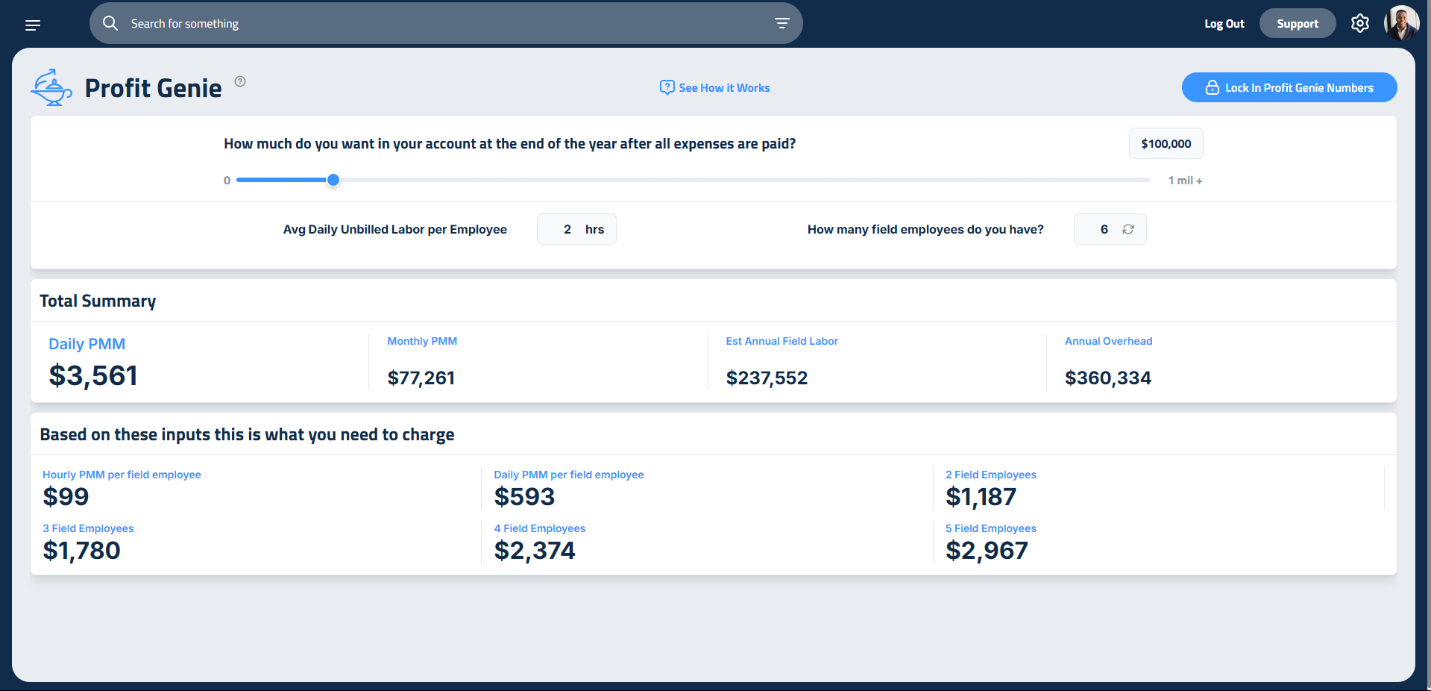
- $237,552 in field labor
- $360,334 in overhead
- A goal of $100,000 in profit
With two hours of unbillable labor per employee per day, their required hourly PMM (Production Minus Materials) is $99. That’s the amount they need to charge per hour to hit their profit goal.
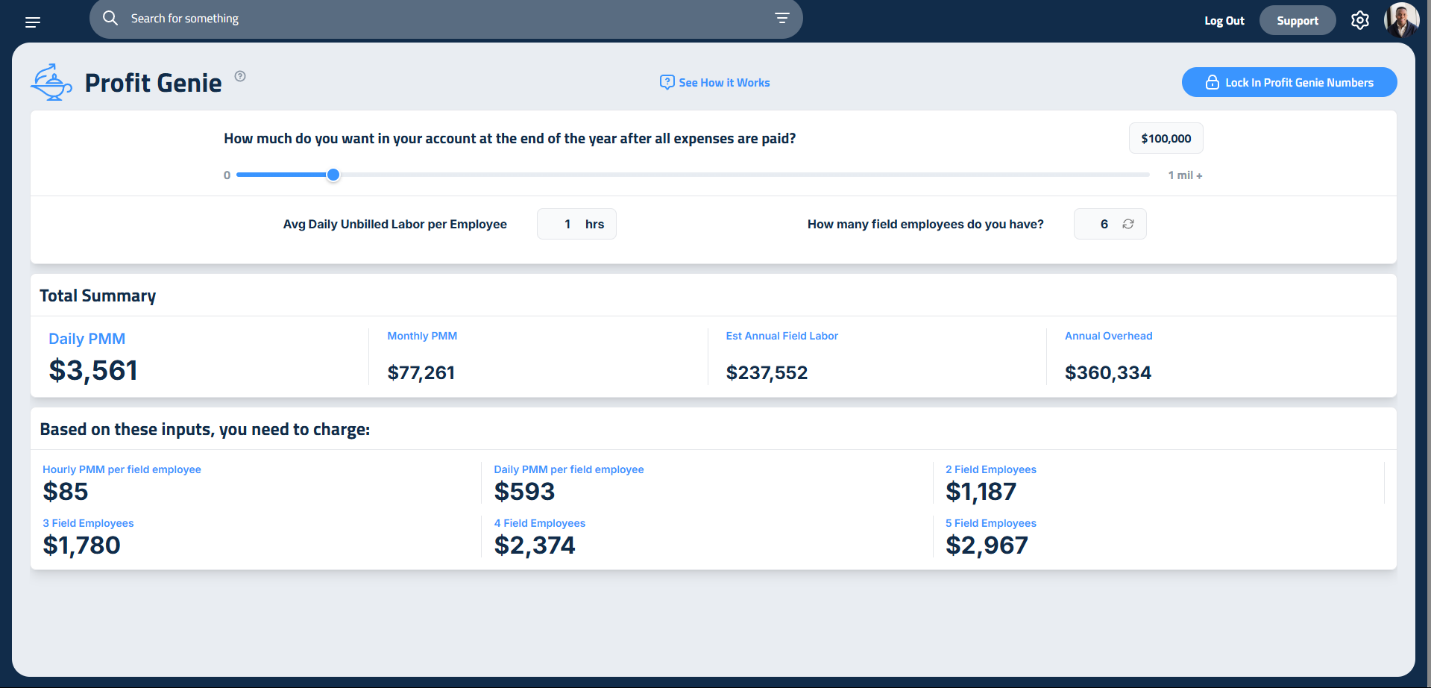
But what happens if they reduce unbillable labor by just one hour?
Their PMM drops to $85. That’s a $14 per hour difference per employee. For a three-person crew, that’s $42 per hour saved, without changing anything else.
Now imagine that crew works 8 hours a day, 5 days a week, for 11 months. That $42 per hour adds up to over $120,000 in savings across the year. And if the company keeps charging the original rate, that savings becomes pure profit.
Suddenly, their $100,000 profit goal becomes $220,000. No price increase. No new clients. Just a smarter use of time.
This is the magic of small adjustments. It’s not about working harder. It’s about working smarter. Profit Genie helps you see the hidden levers in your business, the ones that are easy to overlook but incredibly powerful when pulled.
Whether it’s reducing travel time, streamlining material pickups, or tightening your install schedule, these small changes compound over time. They give you room to breathe, space to grow, and confidence that your numbers are working for you, not against you.
Adding Field Employees
Profit Genie also helps you model how adding employees affects your pricing.
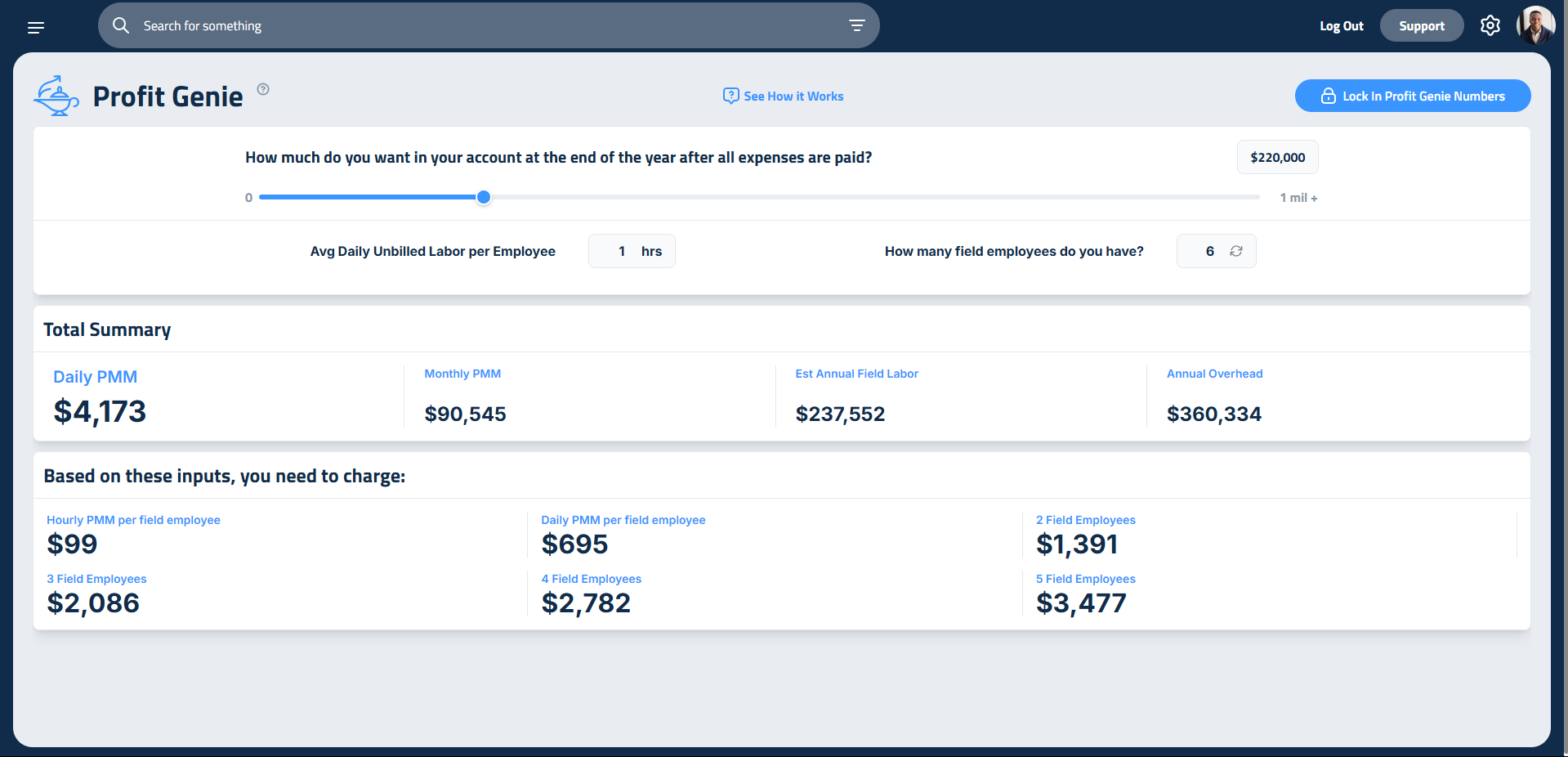
Let’s say your goal is $100,000 in profit. With one hour of unbilled labor, you need to charge $85 per hour.
If you want to double your profit to $200,000, you only need to raise your hourly rate by $12.
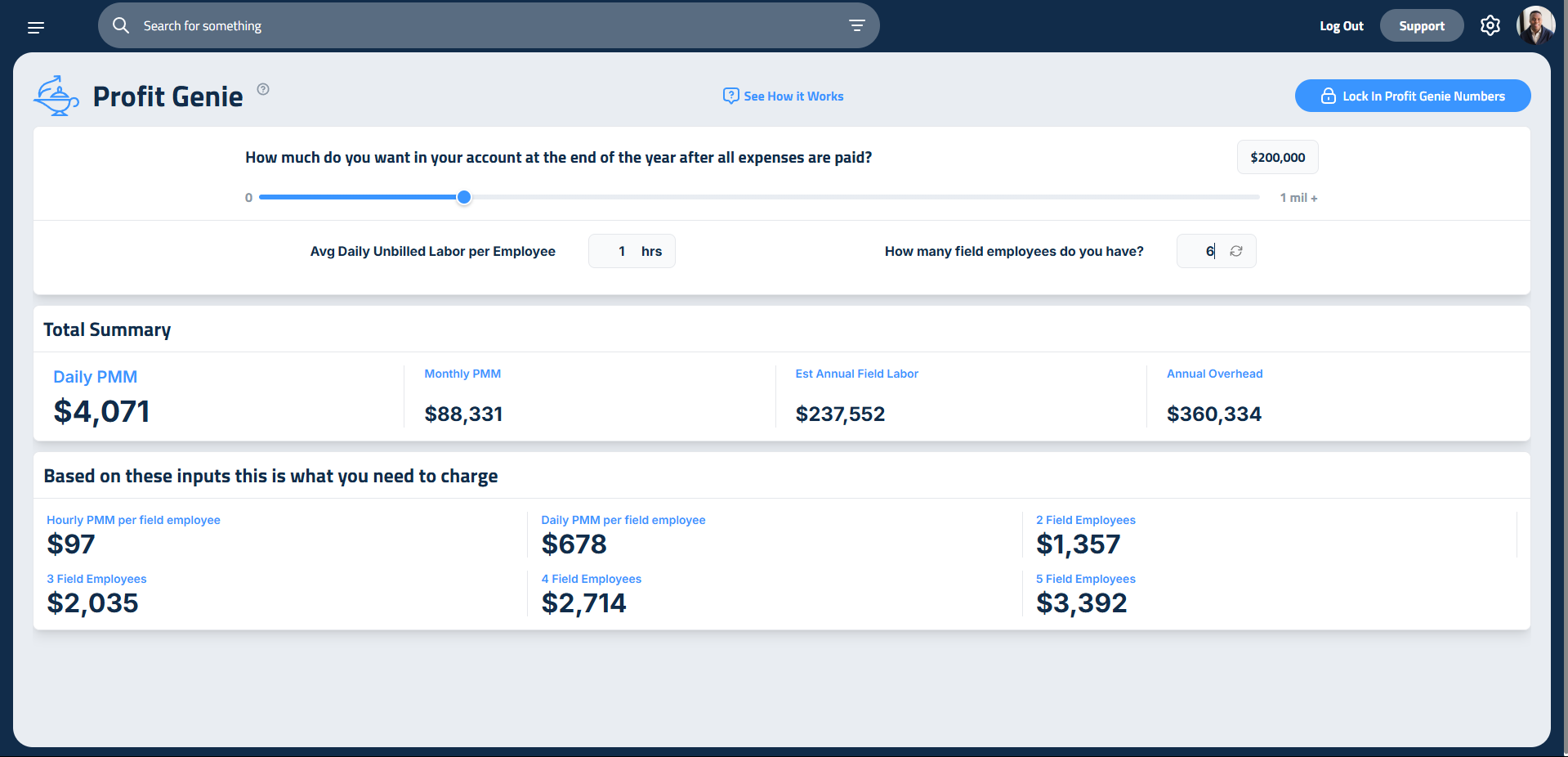
But what if that new rate feels too high for your market? You can model adding another crew member by adjusting the “How many field employees do you have?” number. In this scenario adding one more employee brings you hourly PMM down to nearly $85. As long as your overhead stays the same, adding a productive employee can help you hit your goal without raising prices.
You'll have to sell enough work to justify this new employee, but this lets you balance your pricing, team size, and profit goals in a way that works for your business.
Seeing What's Locked (and What's Drifted)
Once you lock in your targets, Profit Genie prices every new proposal off that locked snapshot. But your business keeps moving. Pay rates change, employees come and go, overhead shifts. So how do you know whether what's locked still matches reality?
Open the Locked Targets panel just below the calculator. It shows a side-by-side view of every number that matters:
- Target is the value the calculator is showing right now
- Locked is what your proposals are actually pricing off of
- Live now is what the number would be if you re-locked today
- Change flags any row where those have drifted apart
You'll see this comparison for your inputs (profit goal, field employees, unbilled labor), your production PMM, and your 1-, 2-, and 3-man crew day rates. Rows that have drifted get an amber pill so you can spot them fast. The tiles on the calculator itself also show a small % vs locked chip, so you can catch drift at a glance without opening the panel.
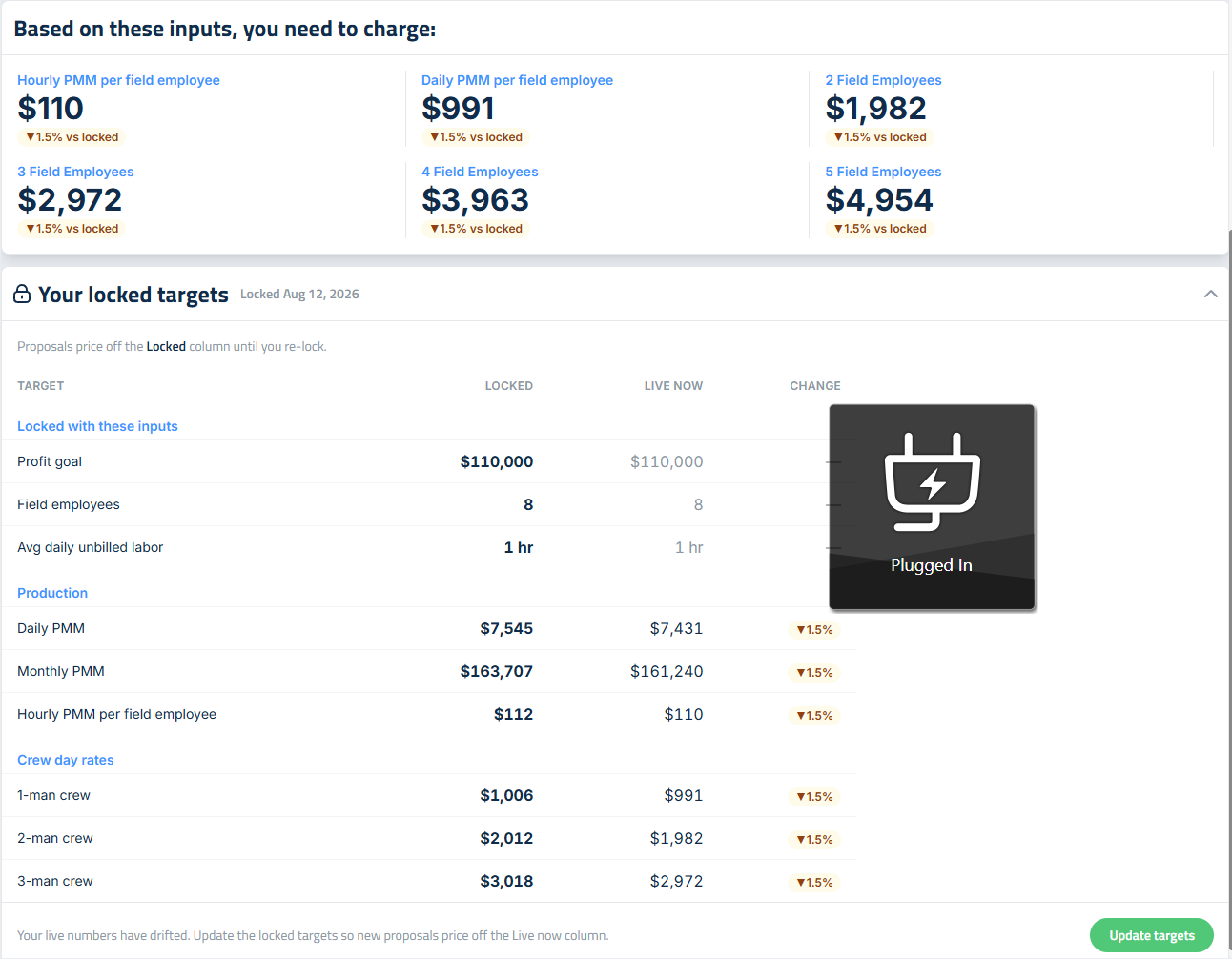
When you're ready to bring your locked snapshot back in line with reality, click Update targets. You'll see a quick old-to-new preview, confirm, and you're done. No unlock and relock dance, and no window where new proposals accidentally price off live numbers before you re-lock.
Real-World Discipline
Profit Genie is powerful, but it’s not magic. If your jobs take longer than planned, if your team racks up unbilled hours, or if you forget to charge for something, that money comes out of your profit.
To make Profit Genie work, you have to stick to it. That means:
- Tracking your time
- Following your pricing
- Staying disciplined
Once you’ve set a realistic goal, you can lock in your settings for the year. This ensures your hourly rate is applied to every proposal you create. It eliminates guesswork and keeps your business on track.
Updated on: 08/13/2026
Thank you!