Ask Profit Genie
Stuck on a screen? Ask Profit Genie. Type a question the way you'd ask a coworker, and Genie answers in plain English with the steps and the screen to find them on. No searching through articles, no waiting on a ticket.
Genie knows how Elevation works and reads from the same help articles you're reading now. It doesn't touch your numbers and it doesn't change anything in your account. It tells you where to click and why it matters.
Opening Genie
Click Ask Profit Genie in the top-right corner of the screen. On a phone or a narrow window, it's the small Genie lamp icon in the top bar instead.
On pages that don't have the top bar, like the proposal your client sees, look for the round Ask Profit Genie button in the bottom-right corner of the screen.

The first time you open it, Genie introduces itself. After that, it opens on the screen you're on.
Start with the Questions on the Screen
Genie changes what it shows depending on where you are. On the Markup screen, you'll see questions like "Why is my price so low?" On the Projects page, you'll see questions about budgets and schedules. If one of them is what you were about to ask, click it.
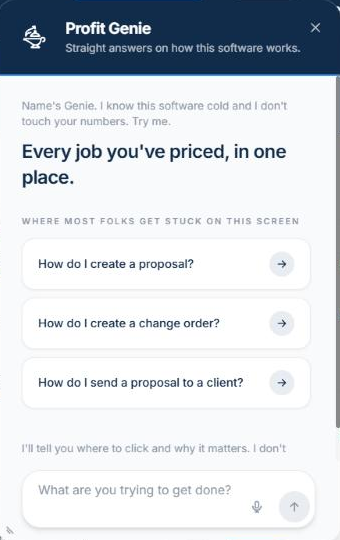
Otherwise, type your own question at the bottom. A few that work well:
- "How do I add a change order after the client accepted?"
- "How do I turn off the hero photo or the video?"
- "How do I invite my foreman and what will it cost?"
- "Why is my markup different on a change order?"
Press Enter to send. Press Shift + Enter to start a new line.
Would rather talk? If your browser supports it, there's a microphone button next to the send arrow. Click it, say your question, read what it typed, and send. Click it again to stop listening.
Reading the Answer
Genie answers with the steps, and often a screenshot from the help article it drew from. Under the answer, a button with the article's name opens the full article in a new tab, so you can read more or share it with your crew.
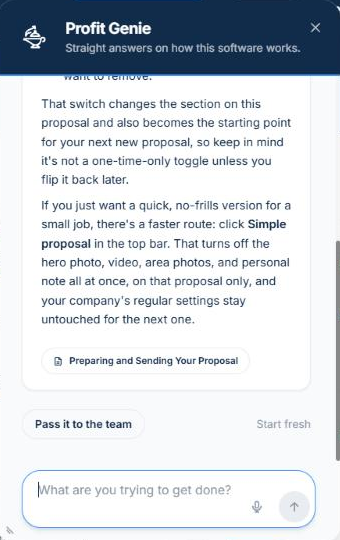
Keep asking follow-ups in the same window. Genie remembers the conversation for as long as your browser tab is open, so "what about on a change order?" works without repeating yourself. Click Start fresh when you want a clean slate.
Move It and Resize It
The Genie window floats above the page so you can keep your work in view while you follow along.
- Move it: drag it by the dark header at the top.
- Resize it: drag the bottom-left corner to make it wider and taller, or the bottom edge to make it taller.
- Close it: click the X, or press Esc.
Genie remembers where you left it and how big you made it, so it opens the same way next time.
What Genie Won't Do
Genie is built to answer questions about the software. It will decline, on purpose, if you ask it to:
- Tell you whether a specific job is priced right. For that, open the Markup screen.
- Give tax or legal rates.
- Cancel or change your subscription, or answer billing questions.
- Show you another company's data.
- Compare Elevation to other products.
- Change something for you. Genie explains how. You make the change.
When Genie Can't Answer
If Genie can't find the answer, or the question needs a person, it will offer to pass it along. Click Pass it to the team and our team gets the whole conversation, so you don't have to explain it again.
You can also use the blue Support button at the top of the screen for a ticket or live chat.
Who Gets It and How Many Questions
Who sees it: everyone on your team except the Field role. Field users work from the mobile app and the time clock.
How many questions: the allowance is per company, per month. Pro plans get 500 answers a month and Startup plans get 250. The count resets on the first of each month. When you're close to the limit, Genie gives you a heads-up. If you reach it, Genie offers to pass your question to the team instead.
Updated on: 10/31/2026
Thank you!