Manager Quick Guide
You run the business day to day. Proposals going out, jobs getting scheduled, crews getting paid, clients getting billed. You're the one people come to when something is stuck, and Elevation Advisor gives you a view of all of it.
Your role sits one step below the owner. You can work anywhere in the operation and see the reports that show whether the work is making money. What you don't own is the cost basis itself, the labor rates, expenses and overhead behind Profit Genie. That stays with the owner, so nobody quietly re-prices the company.
Your First Day
- Sign in, set your password, then open Settings, Account & Profile, and check the company details, time zone and holidays are right. Holidays affect scheduling.
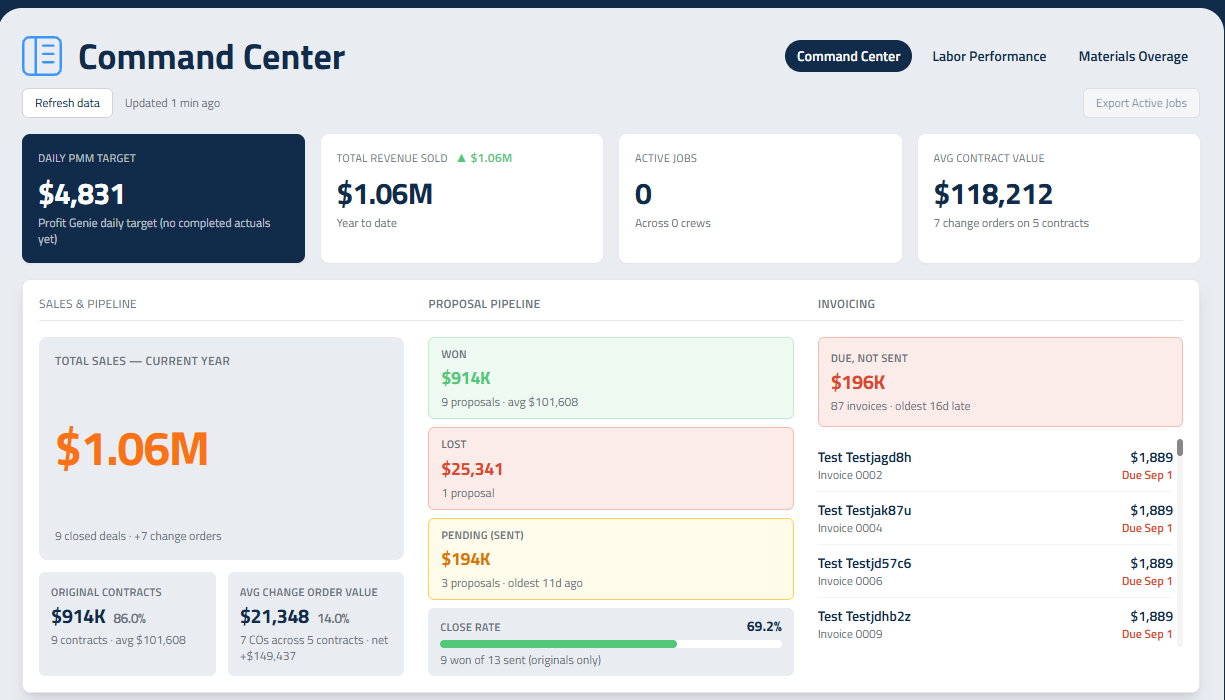
- Open the Dashboard and spend ten minutes in the Command Center. That’s the view you’ll use to spot trouble.
- Open Proposals and Projects and see what's actually in flight.
- Look at Crews and make sure every field employee is on the right crew with the right foreman.
Where You Spend Your Week
The pipeline. Proposals shows every quote by stage. Anything sitting in Sent for two weeks is either a follow-up somebody owes or a job you've lost and haven't admitted. Keep it honest so the number at the top means something.
The schedule. Smart Calendar is where jobs get real dates and crews. Watch for jobs accepted but never scheduled, that's the gap that makes clients call.
The money going out the door. Timesheets is yours: review the week, fix what's wrong, export for your payroll provider and submit to lock it. Once submitted, entries are locked, so review before rather than repairing after.

The money coming in. You can start invoicing on a project and send invoices. Remember that each invoice is created as a draft on its due date and waits for a person to send it. Decide who owns that in your company, you or accounting, and make it a standing weekly task.
The reports. You get the full Command Center, including the Labor Performance and Materials Overage views. Use them for the questions that matter: which jobs beat their hours, which lost money, which crews are consistently over. That’s where next year’s prices come from.
What You Can't Reach, and Why
Profit Genie, the labor rates and company expenses belong to the owner. If a job prices oddly and you suspect the rates behind it, take it to them with the numbers rather than compensating with markup.
Your Week
- Pipeline reviewed and stale proposals chased
- Accepted jobs scheduled with a crew
- Timesheets reviewed, exported and submitted on time
- Invoices due actually sent, not left as drafts
- Command Center checked for jobs running over
- Change orders raised for extra work instead of absorbed
Updated on: 10/31/2026
Thank you!