Billing and Seats
Your plan comes with one user. Everyone you add after that is a seat, and seats are what show up on your bill. This article explains what a seat costs, when you get charged, and what happens when people come and go.
What a seat costs
Every plan includes one full user. On Startup, that's the whole story: one user, no seats to add.
On Pro, each person after that first user is a paid seat, priced by the level of access you give them:
- Full seat, $19.97 a month: Admin, Manager, Accounting, Estimator/Sales, Foreman/Project Manager
- Field seat, $5.97 a month: the Field role
The seat is priced by the highest access the person has, so a foreman who also needs to build proposals is a full seat, not a field seat.
Seats are always billed monthly, even if your plan is annual. If you pay annually, your seats ride on a small separate monthly subscription and your annual plan is never touched.
Seeing what you're paying for
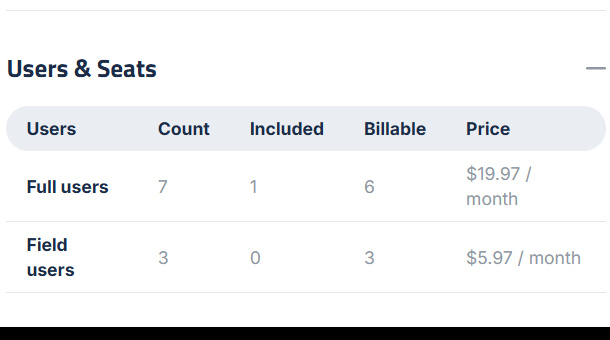
Go to Settings, then Account & Profile, and open Users & Seats. The table shows where every user sits:
- Count: how many people you have at that level
- Included: how many are covered by your plan
- Billable: how many you're paying for
- Price: what each one costs a month
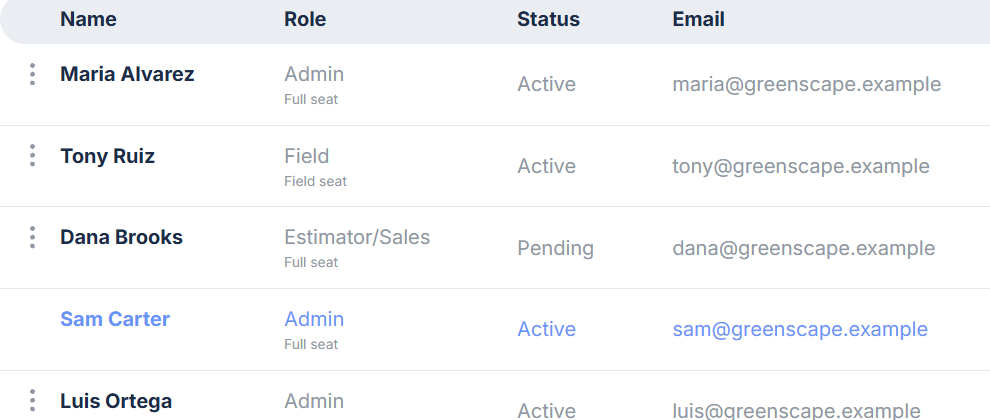
The Members page shows the same thing person by person. Under each person's role you'll see Full seat or Field seat, so you can tell at a glance who is costing what.
Adding someone
When you invite a user, the form tells you what that person costs before you send the invitation, for example "Full user, $19.97 / month". If a seat you're already paying for is sitting empty, it says so instead: "no extra charge, a seat already on your plan covers it".
You're charged when adding someone takes you past what you've already paid for this billing period. If you're filling a seat you already bought, there's nothing new to pay.
Changing someone's role
Changing a role can change the seat. Elevation Advisor tells you the money before you confirm:
- Moving up to full access: "Moves to a full seat at $19.97 / month, prorated from today on your next invoice." You pay the difference for the rest of the month.
- Moving down to Field: "Moves to a field seat at $5.97 / month from your next invoice." The cheaper price starts next cycle. The full seat you already paid for this month isn't credited, because that month is already bought.
Removing someone
What happens depends on how long ago they were invited:
- Invited less than seven days ago: the seat comes off right away, and if you were charged for it, that charge is credited back. This is the "wrong email address" safety net.
- Anyone else: the seat stays on your plan until your next renewal date, and nothing is credited. You've paid for the month, so you keep the month.
That second rule is worth reading twice, because it's also an opportunity: a seat you've paid for can be given to someone else at no extra charge until it renews. If a crew leader leaves in the middle of the month, invite their replacement into that seat and you pay nothing more.
Rules that surprise people
- A decrease never credits, apart from that seven-day invitation window. Adding someone back later in the same period costs nothing, because the seat is still paid for.
- Raising your included users doesn't credit either. If your plan starts covering more people, the saving shows up on your next invoice rather than as money back.
- Some changes are free on purpose, and start billing from your next invoice instead of today: a field seat created by moving someone down, a change to how many users your plan includes, and turning seat billing on for a company.
Where the invoices live
Click Billing Portal on the Account & Profile page to see invoices, receipts, and the card on file. That's Stripe's own portal, so it always shows exactly what was charged and when.
Updated on: 10/31/2026
Thank you!